How a Product Configurator Can Transform the Online Shopping Experience

Online customers increasingly want more than a standard product page. They want to see different options, personalize products, compare variations, and understand exactly what they are purchasing before placing an order.

A product configurator can help businesses provide this interactive shopping experience. It allows customers to customize products according to their preferences, such as color, size, material, design, features, accessories, and other available options.

What Is a Product Configurator?

A product configurator is an interactive tool that allows customers to build or personalize a product online.

For example, a customer purchasing furniture may be able to select the size, material, color, finish, and additional features. The product preview can update according to the customer’s selections, giving them a better understanding of the final product.

Modern configurators can also provide real-time pricing and product availability based on the selected options.

Why Are Product Configurators Important for E-Commerce?

Traditional product pages usually show customers a fixed product with a limited number of images. A product configurator provides a more interactive experience.

With a well-designed configurator, customers can:

  • Customize products according to their requirements
  • View different product variations
  • See changes in real time
  • Get dynamic pricing
  • Understand product options more clearly
  • Make more confident purchasing decisions

This can make the buying journey easier and more engaging.

Benefits of Using a Product Configurator

1. Better Customer Experience

Customers can interact with products instead of simply viewing static images. They can explore different combinations and create a product that matches their preferences.

2. Increased Customer Engagement

Interactive product customization encourages customers to spend more time exploring products and available options.

3. Improved Buying Confidence

When customers can preview their customized product before purchasing, they can better understand what they will receive.

4. Dynamic Pricing

A product configurator can automatically update the product price when customers change options, materials, sizes, or additional features.

5. Reduced Product Returns

Providing customers with a clear preview of their customized product can help reduce misunderstandings about product specifications and customization.

6. Support for Complex Products

Businesses selling products with multiple combinations and dependencies can use configurators to simplify the selection process.

2D and 3D Product Configurators

Depending on the product and business requirements, companies can implement either 2D or 3D product configurators.

A 2D configurator can display different product views, colors, layers, and design options. A 3D configurator can provide a more immersive experience by allowing customers to view a product from different angles.

For products such as furniture, jewelry, fashion items, accessories, and customized equipment, interactive visualization can make product selection much easier.

Product Configurator Features

A modern product configurator can include features such as:

  • Real-time product visualization
  • Color and material selection
  • Size and feature customization
  • Dynamic price calculation
  • Product variant management
  • Image and texture customization
  • Add-to-cart functionality
  • E-commerce integration
  • Admin configuration management
  • Mobile-responsive design
  • Multi-language support
  • Multi-currency support

The exact features can be customized according to the product and business workflow.

Industries That Can Benefit From Product Customization

Product configurators can be useful across many industries, including:

  • Furniture and interior design
  • Fashion and apparel
  • Jewelry
  • Electronics
  • Accessories
  • Manufacturing
  • Home improvement
  • Retail and e-commerce
  • Modular products
  • Customized equipment

For businesses with products that have multiple variations, a configurator can simplify the purchasing process for customers.

How Babysoft Software Can Help

Babysoft Software develops custom product configurator and product customizer solutions for businesses that want to provide interactive online shopping experiences.

Our team can develop solutions with features such as real-time customization, dynamic pricing, product visualization, product variant management, and e-commerce integration.

If your business needs a customized product configurator, you can learn more about our Product Configurator & Customizer Development Services and explore how a custom solution can be designed around your business requirements.

Why Choose a Custom Product Configurator?

Every business has different products, pricing rules, customization options, and workflows. A custom configurator allows these requirements to be built directly into the application.

Instead of forcing your business to work with a generic customization tool, a custom solution can be designed around your product structure and customer journey.

Conclusion

A product configurator can turn a traditional online product page into an interactive shopping experience. By allowing customers to customize products, visualize their selections, and see pricing changes in real time, businesses can make product selection easier and more engaging.

For businesses looking to offer personalized products online, investing in a well-designed product configurator can be an effective way to improve the customer experience and support online sales.

Babysoft Software can help businesses develop customized product configurator solutions based on their products, features, pricing structure, and e-commerce requirements.

How Hostex Integration Helps Vacation Rental Businesses Automate Operations

Managing vacation rental properties involves much more than accepting bookings. Property managers need to manage reservations, guest communication, property information, availability, pricing, and multiple booking channels. As the number of properties grows, handling these tasks manually can become time-consuming.

At Babysoft Software, we help businesses connect their property management systems with websites, applications, APIs, and other business platforms. Hostex integration can help vacation rental businesses streamline their daily operations and create a more connected management workflow.

What Is Hostex Integration?

Hostex integration is the process of connecting the Hostex property management platform with other business systems, websites, applications, and communication tools.

A well-planned integration can help businesses synchronize property and booking information while reducing repetitive manual tasks.

For businesses looking for professional integration solutions, Babysoft Software provides Hostex Integration Services based on individual business requirements.

Why Is Hostex Integration Important?

Vacation rental businesses often manage properties across different platforms. Without proper integration, employees may need to enter the same information into multiple systems.

Hostex integration can help businesses:

  • Reduce repetitive data entry
  • Improve property management
  • Manage booking information more efficiently
  • Automate routine processes
  • Improve guest communication
  • Connect different business systems
  • Save time and operational resources

Hostex Integration with Websites

A vacation rental business may have its own website where guests can view properties, check availability, and make booking requests.

Connecting the website with Hostex can help create a more connected workflow between the website and property management system.

For example, booking-related information can be transferred between systems, helping property managers keep their information organized and up to date.

At Babysoft Software, we develop custom integrations that can connect Hostex with existing websites and business applications.

Improve Guest Communication

Guest communication is an important part of vacation rental management. Guests may need booking confirmations, property information, check-in instructions, reminders, and other updates.

Businesses can connect their communication systems with their property management workflow to make these processes more efficient.

For example, messaging platforms can be used to communicate with guests during different stages of their booking journey.

If your business also needs messaging platform integration, you can explore Babysoft Software’s LINE Integration Services for connecting LINE-based communication with websites, CRM systems, and other business applications.

Connect Hostex with Other Business Systems

Hostex may need to work together with other applications used by a vacation rental business.

Depending on the requirements, integration can be designed around systems such as:

  • Property management platforms
  • Booking websites
  • CRM systems
  • Customer support platforms
  • Communication tools
  • Accounting applications
  • Custom web applications
  • Mobile applications

Connecting these systems can help businesses create a centralized and more efficient workflow.

Automate Vacation Rental Operations

Automation can reduce the amount of manual work involved in managing properties.

For example, businesses can create workflows for:

  • Booking updates
  • Guest notifications
  • Reservation information
  • Property availability
  • Check-in and check-out communication
  • Customer support requests
  • Internal property management tasks

Automation allows property managers to spend less time on repetitive activities and more time focusing on guests and business growth.

Benefits of Hostex Integration

Save Time

Integration can reduce repetitive data entry and manual updates across different systems.

Reduce Errors

Automatically transferring information between connected systems can help reduce mistakes caused by manual data entry.

Improve Guest Experience

Faster communication and better access to booking information can help businesses provide a smoother guest experience.

Centralize Business Data

Connecting Hostex with other applications can make important property and booking information easier to manage.

Support Business Growth

A connected system can make it easier for property managers to manage a growing number of properties and reservations.

Why Choose Babysoft Software?

Babysoft Software provides custom web development, API integration, and software integration solutions for businesses.

Our team can help businesses understand their existing workflow and create integration solutions based on their specific requirements.

Our integration process can include:

  1. Understanding your business requirements
  2. Reviewing your existing systems
  3. Planning the integration workflow
  4. Connecting Hostex with the required platforms
  5. Developing custom API functionality where required
  6. Testing the integration
  7. Deploying and supporting the solution

Hostex Integration for Your Business

Every vacation rental business has different requirements. Some businesses may need Hostex integration with their website, while others may need connections with CRM systems, communication platforms, or custom applications.

At Babysoft Software, we can help you create a Hostex integration solution that fits your business workflow and technology requirements.

If you are looking for a reliable Hostex integration service provider, you can learn more about our Hostex Integration Services.

You can also explore our LINE Integration Services if you want to connect LINE communication with your website or business application.

Conclusion

Hostex integration can help vacation rental businesses improve property management, reduce repetitive work, organize booking information, and improve guest communication.

By connecting Hostex with websites, CRM systems, communication platforms, and custom applications, businesses can create a more efficient and scalable workflow.

Babysoft Software can help businesses plan and implement custom integration solutions based on their individual requirements.

How LINE Integration Helps Businesses Improve Customer Communication

Customer communication has become an important part of running a successful online business. Customers expect quick responses, timely notifications, and convenient ways to interact with businesses. Messaging platforms such as LINE can help businesses create a more direct and engaging communication experience.

At Babysoft Software, we help businesses integrate messaging platforms and APIs with their existing websites, applications, CRM systems, and business software. Our LINE Integration Services are designed to help businesses improve communication, automate routine messages, and provide a better customer experience.

What Is LINE Integration?

LINE integration is the process of connecting the LINE messaging platform with a website, mobile application, CRM, ERP, booking system, or other business software.

With a properly implemented integration, businesses can use LINE for customer messages, notifications, automated responses, reminders, updates, and other communication workflows.

Businesses looking for professional implementation can learn more about LINE Integration Services by Babysoft Software.

Why Should Businesses Integrate LINE?

LINE is widely used in markets such as Japan, Taiwan, Thailand, and Indonesia. This makes it an effective communication channel for businesses that want to connect with customers who already use the platform.

A LINE integration can help businesses:

  • Improve customer communication
  • Send automated notifications
  • Provide faster customer support
  • Connect messaging with existing business systems
  • Reduce repetitive manual communication
  • Share images, documents, and other rich media
  • Create automated workflows and chatbot experiences

LINE Integration with Existing Websites

One of the biggest advantages of LINE integration is the ability to connect it with an existing web application.

For example, an eCommerce website can use LINE to send order confirmations, shipping notifications, delivery updates, and customer support messages.

Similarly, service-based businesses can use LINE for appointment reminders, booking updates, customer queries, and important notifications.

At Babysoft Software, we can help businesses connect LINE APIs with their existing applications according to their specific communication requirements.

LINE Integration for Customer Support

Customer support teams often receive repetitive questions and requests. LINE integration can help automate some of these communication processes.

For example, businesses can create automated responses for:

  • Frequently asked questions
  • Order status
  • Booking confirmations
  • Appointment reminders
  • Payment notifications
  • Service updates
  • Customer requests

For more complex requirements, businesses can also implement chatbot functionality to provide customers with quick responses.

Connect LINE with CRM and Business Systems

Businesses often use multiple systems to manage customers and operations. Connecting LINE with these systems can create a more centralized communication workflow.

LINE can be integrated with systems such as:

  • CRM platforms
  • ERP systems
  • Customer support software
  • Booking systems
  • eCommerce websites
  • Mobile applications
  • Custom business applications

This allows businesses to manage customer communication more efficiently while keeping their existing software ecosystem connected.

Automation with LINE API

Automation is another important benefit of LINE integration.

Businesses can configure automated workflows to send messages when specific events occur. For example, when a customer completes an order, books a service, or submits a request, the system can automatically trigger a LINE notification.

This reduces manual work and helps businesses provide faster responses.

Rich Media and Interactive Communication

LINE supports more than simple text communication. Businesses can use rich media and interactive features to create a better customer experience.

Depending on the business requirements, communication may include:

  • Images
  • Videos
  • Documents
  • Interactive messages
  • Stickers and emojis
  • Automated responses
  • Chatbot interactions

These features can make customer communication more engaging and easier to understand.

How Babysoft Software Can Help

Babysoft Software provides software development and API integration services for businesses looking to connect third-party platforms with their existing applications.

Our approach can include:

  1. Understanding your business communication requirements
  2. Planning the LINE integration workflow
  3. Connecting the LINE API with your application
  4. Configuring automated messages and notifications
  5. Integrating LINE with CRM, ERP, or support systems
  6. Testing the complete communication workflow
  7. Deploying and monitoring the integration

Our goal is to create a reliable integration that fits the existing technology and workflow of your business.

Benefits of LINE Integration for Businesses

A properly implemented LINE integration can provide several benefits:

Better Customer Engagement

Businesses can communicate with customers through a platform they already use, making communication more convenient.

Faster Responses

Automated messages and chatbot functionality can provide immediate responses to common customer requests.

Reduced Manual Work

Automation reduces the need for employees to manually send repetitive notifications and updates.

Centralized Communication

Connecting LINE with existing business applications can help businesses manage communication through a more organized workflow.

Improved Customer Experience

Timely notifications, personalized messages, and interactive communication can make the overall customer experience better.

Choose Babysoft Software for LINE Integration

Choosing the right technology partner is important when integrating a messaging platform with your existing software.

Babysoft Software has experience in web development, API integration, and custom software solutions. We can help businesses plan and implement LINE integrations based on their specific requirements.

If you are planning to connect LINE with your website, CRM, ERP, booking system, or custom application, explore our LINE Integration Services to learn more about how Babysoft Software can help.

Conclusion

LINE integration can help businesses improve customer communication, automate notifications, connect existing business systems, and provide a more engaging customer experience.

Whether you need LINE integration for an eCommerce website, customer support platform, booking system, CRM, or custom application, a properly planned API integration can help streamline communication and reduce manual work.

Babysoft Software can help you build and integrate LINE-based communication solutions that match your business requirements.

How a Professional School Website Helps Schools Build a Strong Digital Presence

In today’s digital world, a professional website has become an important part of a school’s online presence. Parents often visit a school website to learn about admissions, academic programs, facilities, activities, faculty, events, and important announcements before making a decision.

A well-designed school website can make this information easy to access while helping schools build trust and communicate effectively with parents and students.

Why Does Your School Need a Professional Website?

A school website is more than just an online brochure. It can become a central platform where schools share important information and communicate with their community.

A modern school website can help you:

  • Showcase your school’s vision, mission, and achievements
  • Provide information about courses and academic programs
  • Share admission details and enquiry forms
  • Display faculty and staff information
  • Publish school events and announcements
  • Highlight student achievements and activities
  • Provide contact information and location details
  • Connect with parents through online communication
  • Create a professional and trustworthy online presence

Important Features of a Modern School Website

A successful school website should be easy to navigate, mobile-friendly, and designed around the needs of parents, students, teachers, and school administrators.

Responsive Website Design

Parents and students may access a school website from smartphones, tablets, laptops, or desktop computers. A responsive design ensures that the website works smoothly across different screen sizes.

Online Admission and Enquiry

Schools can simplify the admission process by providing online enquiry and registration forms. Parents can submit their information without having to visit the school physically.

Student and Staff Management

A customized school website can include features that help schools manage student and staff-related information efficiently.

Events and Announcements

Schools can publish important announcements, upcoming events, academic activities, holidays, and other updates in one central location.

Social Media Integration

Connecting the website with social media platforms allows schools to share updates and increase engagement with parents and students.

Easy Content Management

An easy-to-manage website allows school administrators to update content, images, announcements, events, and other information without depending on technical teams for every small change.

How Babysoft Software Helps Schools Build Better Websites

At Babysoft Software, we provide customized school website design and development solutions based on the individual requirements of educational institutions.

Our team focuses on creating professional, responsive, user-friendly, and scalable school websites that help educational institutions establish a strong digital presence.

You can explore our School Website Design Services to learn more about our school website solutions.

Babysoft Software can help schools with features such as responsive design, student management, staff management, admission enquiries, social media integration, school information, and customized website functionality.

Benefits of Choosing Babysoft Software

When developing a school website, Babysoft Software focuses on both design and functionality.

Customized Website Development

Every school has different requirements. We create customized solutions based on the school’s goals, branding, content, and required features.

Mobile-Friendly Design

We develop websites that provide a smooth experience across smartphones, tablets, laptops, and desktop devices.

Search Engine Friendly Structure

A well-structured website can help schools improve their online visibility and make it easier for parents to discover their services through search engines.

User-Friendly Experience

Clear navigation and organized information help parents quickly find admission details, school activities, contact information, and other important resources.

Ongoing Support

After the website is launched, Babysoft Software can provide technical support and assistance to help keep the website running smoothly.

Build Your School’s Digital Presence With Babysoft Software

A professional school website can improve communication, strengthen credibility, simplify admissions, and provide parents with easy access to important school information.

If you are planning to create or redesign your school website, Babysoft Software can help you build a modern and customized digital platform according to your school’s requirements.

Explore our School Website Design Services and discover how Babysoft Software can help your school create a stronger online presence.

How a Professional Beauty Website Can Help Grow Your Beauty Business

In today’s competitive beauty industry, having a professional online presence is essential for salons, spas, beauty clinics, makeup artists, and other beauty businesses. Customers increasingly search online before choosing a beauty service, so your website often becomes the first impression of your brand.

At Babysoft Software, we understand the specific requirements of beauty businesses and help create modern, responsive, and user-friendly websites designed to attract customers and support business growth.

Why Does Your Beauty Business Need a Professional Website?

A well-designed beauty website allows you to showcase your services, display your work, provide important business information, and make it easier for customers to contact or book your services.

With a professional website, you can:

  • Showcase your beauty services and treatments
  • Display products, pricing, and special offers
  • Allow customers to book appointments online
  • Share your location and business opening hours
  • Connect your website with social media platforms
  • Provide an easy way for customers to contact your business
  • Build trust through testimonials, reviews, and professional images

Important Features of a Beauty Website

1. Responsive Website Design

Your beauty website should work smoothly on smartphones, tablets, laptops, and desktop computers. Babysoft Software develops responsive websites that provide a consistent experience across different screen sizes.

2. Beauty Service Management

A beauty website should make it easy to present your services, treatments, pricing, packages, and promotions. Customers can quickly understand what you offer and choose the services that match their needs.

3. Online Appointment Booking

Online booking can make it easier for customers to schedule appointments without having to call your business. A convenient booking experience can also help beauty businesses manage customer appointments more efficiently.

4. Product and Order Management

If you sell beauty products, your website can provide customers with an easy way to explore products and place orders online. Product information, images, pricing, and availability can be presented in an organized manner.

5. Social Media Integration

Beauty businesses depend heavily on visual content and customer engagement. Integrating social media with your website can help visitors discover your social profiles, view your latest work, and connect with your business.

6. Location and Business Information

Your website should clearly display your business location, opening hours, contact information, and other important details so customers can easily find and contact you.

How Babysoft Software Helps Beauty Businesses

At Babysoft Software, we provide customized beauty website design solutions based on the requirements of your business. Our approach focuses on creating websites that combine attractive design with useful business features.

Whether you operate a beauty salon, spa, beauty clinic, makeup studio, or another beauty-related business, we can help you build a website that represents your brand professionally.

Learn more about our Beauty Website Design Services and explore features such as responsive design, service management, appointment booking, product and order management, location information, and social media integration.

Why Choose Babysoft Software?

Choosing the right website development partner is important for creating a successful online presence. Babysoft Software focuses on understanding your business requirements and developing solutions around your specific goals.

We can help you create a website that:

  • Reflects your beauty brand and visual identity
  • Works smoothly across mobile and desktop devices
  • Makes your services easy to explore
  • Supports online appointments and customer enquiries
  • Helps showcase your products and services
  • Provides an engaging experience for potential customers

Build a Strong Online Presence for Your Beauty Business

A professional website is more than just an online brochure. It can become an important part of your beauty business by helping customers discover your services, learn about your brand, make enquiries, and book appointments.

If you are looking for a reliable partner to create a professional website for your beauty business, Babysoft Software can help you develop a customized solution according to your requirements.

Explore our Beauty Website Design Services to learn more about how Babysoft can help you build a modern online presence for your beauty business.

WhatsApp Business API: A Complete Guide to Business Messaging and Automation

WhatsApp has become one of the most widely used communication platforms for businesses looking to connect with customers quickly and conveniently. From answering customer questions to sending order updates, appointment reminders, promotional messages, and support notifications, businesses can use WhatsApp to manage conversations throughout the customer journey.

At Babysoft, we help businesses integrate the WhatsApp Business API with their websites, CRM systems, customer support platforms, eCommerce applications, and other business solutions. Our WhatsApp Business API integration services help businesses improve customer communication through automated, personalized, and efficient WhatsApp messaging.

The WhatsApp Business API takes business communication a step further by allowing companies to connect WhatsApp with their existing business systems and workflows.

What Is WhatsApp Business API?

WhatsApp Business API is a solution designed for businesses that need to communicate with customers at scale. Unlike the standard WhatsApp Business application, the API can be integrated with existing business systems and workflows.

With a WhatsApp Business API integration, businesses can automate messages, manage customer conversations, send notifications, and create customized communication workflows without relying entirely on manual responses.

At Babysoft, we develop WhatsApp Business API integrations according to the specific communication and automation requirements of each business.

Why Do Businesses Need WhatsApp Business API?

Customers expect fast responses and convenient communication channels. Email and phone calls are still useful, but many customers prefer messaging because it is quick, familiar, and convenient.

WhatsApp Business API can help businesses:

  • Communicate with customers through WhatsApp
  • Automate frequently used messages
  • Send order and delivery updates
  • Provide customer support
  • Send appointment and booking reminders
  • Generate leads through WhatsApp
  • Connect WhatsApp with CRM and business applications
  • Improve customer engagement
  • Reduce repetitive manual communication

With Babysoft’s WhatsApp Business API integration services, businesses can connect their existing applications with WhatsApp and create communication workflows based on their business requirements.

How Does WhatsApp Business API Work?

The API works as a communication layer between WhatsApp and a company’s existing systems.

For example, when a customer places an order on an eCommerce website, the website can trigger an automated WhatsApp notification. Similarly, a CRM system can use the API to send customer updates or support notifications.

A typical workflow can look like:

Customer → Business Application → WhatsApp Business API → WhatsApp Message → Customer

At Babysoft, we can integrate this communication flow with websites, CRM systems, booking platforms, customer management systems, and other business applications.

This integration allows businesses to build automated and personalized communication workflows.

WhatsApp Business API vs WhatsApp Business App

The WhatsApp Business app is generally suitable for small businesses that manage customer conversations manually.

The WhatsApp Business API is better suited for businesses that need:

  • Automation
  • System integration
  • Multiple-user access
  • Customer support workflows
  • Automated notifications
  • Large-scale customer communication

Businesses that need to connect WhatsApp with their existing software can work with Babysoft to develop a customized WhatsApp Business API integration.

Key Features of WhatsApp Business API

Automated Customer Messages

Businesses can automate commonly used messages and reduce repetitive manual communication.

With Babysoft’s WhatsApp integration solutions, businesses can create automated communication workflows based on specific customer actions or events.

Order and Delivery Notifications

eCommerce businesses can send order confirmations, shipping updates, delivery notifications, and other transactional messages through WhatsApp.

These notifications can be connected directly with the business’s existing website or eCommerce system.

Guest Communication

For hotels, resorts, villas, and other hospitality businesses, WhatsApp can provide a direct communication channel between the business and its guests.

Appointment and Booking Reminders

Healthcare providers, salons, consultants, educational institutions, hotels, and other service businesses can use WhatsApp to send appointment, booking, and confirmation messages.

For example, a booking system can automatically send a WhatsApp message when a customer creates or updates a reservation.

Customer Support

Businesses can connect WhatsApp with their customer support systems so that customer conversations can be managed more efficiently.

Babysoft can help businesses build WhatsApp-based customer communication workflows that allow customers to interact with the business through WhatsApp.

CRM Integration

Integrating WhatsApp with a CRM can help businesses connect customer conversations with existing customer records and sales workflows.

Babysoft can integrate WhatsApp communication with existing business applications so that relevant customer information and conversations can be connected with the company’s workflow.

WhatsApp Chatbots

Businesses can build automated conversational experiences for frequently asked questions, lead qualification, customer support, booking assistance, and other repetitive tasks.

A WhatsApp chatbot can help businesses provide faster responses while reducing the amount of repetitive manual work.

Real-World WhatsApp Business API Implementation

One example of WhatsApp integration is Club Miracle, where WhatsApp is implemented to support communication with guests.

In this type of implementation, WhatsApp can be used as a communication channel between the business and its guests. Guest-related conversations, messages, and notifications can be connected with the business’s existing systems.

This demonstrates how WhatsApp Business API can be integrated into a real business workflow rather than being used only as a standalone messaging application.

Babysoft can develop similar WhatsApp Business API integrations according to the communication requirements of hotels, hospitality businesses, eCommerce companies, service providers, and other organizations.

How to Integrate WhatsApp Business API With a Website

A WhatsApp Business API integration can be developed according to the requirements of the business.

The general process includes:

  1. Define the communication requirements.
  2. Set up the required WhatsApp Business environment.
  3. Configure the API and business messaging infrastructure.
  4. Connect the API with the website or business application.
  5. Create required message templates and workflows.
  6. Implement automation and customer communication features.
  7. Test the integration.
  8. Monitor and optimize the messaging workflow.

At Babysoft, our development team can help businesses connect WhatsApp Business API with their existing websites and applications and develop communication workflows according to their requirements.

Benefits of WhatsApp Business API Integration

Faster Customer Communication

WhatsApp provides businesses with a convenient way to communicate with customers quickly.

Improved Customer Experience

Customers can receive important information and support through a communication platform they already use regularly.

Automated Communication

Businesses can automate repetitive notifications and messages instead of handling every communication manually.

Better Business Workflow

Connecting WhatsApp with existing applications can help businesses centralize customer communication and automate important processes.

Scalable Communication

The WhatsApp Business API can support businesses as their customer communication requirements grow.

Why Choose Babysoft for WhatsApp Business API Integration?

Babysoft provides software development and API integration services for businesses looking to improve their digital communication.

Our team can help with:

  • WhatsApp Business API integration
  • Website and WhatsApp integration
  • CRM and WhatsApp integration
  • Automated customer notifications
  • Customer support workflows
  • WhatsApp chatbot development
  • Booking and appointment notifications
  • eCommerce WhatsApp integration
  • Custom WhatsApp communication workflows
  • Third-party API integration

We focus on understanding the business requirement first and then developing an integration that fits the existing website, application, or business workflow.

Get Started With WhatsApp Business API Integration

If your business wants to use WhatsApp for customer communication, notifications, support, bookings, or automation, a properly integrated WhatsApp Business API can help streamline the process.

Babysoft can help you plan and develop a WhatsApp Business API integration according to your business requirements.

Whether you need WhatsApp integration for an eCommerce website, CRM, booking system, hospitality business, customer support platform, or custom application, our team can help you build the required solution.

Contact Babysoft to discuss your WhatsApp Business API integration requirements and build a customized communication solution for your business.

Payment Gateway Integration: A Complete Guide for Secure Online Payments

Introduction to Payment Gateway Integration

Payment gateway integration is an essential part of any modern e-commerce website, mobile application, or online business that accepts digital payments. It connects your website or app with a payment service provider, allowing customers to securely pay for products and services using credit cards, debit cards, UPI, net banking, digital wallets, and other available payment methods.

A properly integrated payment gateway makes the checkout process faster, smoother, and more secure. It securely transfers payment information between the customer, merchant, payment processor, and bank while helping verify and authorize transactions.

For businesses, choosing the right payment gateway integration solution can improve the customer experience, reduce payment failures, support multiple payment methods, and provide reliable transaction management. Whether you run an e-commerce store, booking platform, SaaS application, or mobile app, seamless payment gateway integration can help you accept payments efficiently and grow your online business.

What Is a Payment Gateway?

A payment gateway is a technology that securely connects a customer’s payment method with a business’s payment processing system. It acts as a bridge between the customer, merchant, payment processor, and bank to authorize and process online transactions.

When a customer makes a payment on a website or mobile app, the payment gateway securely collects the required payment details, encrypts the sensitive information, and sends the transaction request to the appropriate payment processor or bank. Once the transaction is approved or declined, the payment gateway sends the result back to the website or application.

Modern payment gateways can support multiple payment methods, including credit cards, debit cards, UPI, net banking, and digital wallets, depending on the provider and region.

For businesses, a reliable payment gateway provides:

  • Secure online transactions
  • Multiple payment options
  • Faster and smoother checkout
  • Transaction authorization and status updates
  • Payment and transaction management
  • Integration with websites, e-commerce platforms, and mobile apps

Payment Gateway Integration for Websites and Mobile Apps

At Babysoft Software, we provide secure and reliable payment gateway integration services for websites and mobile applications.
Our team has experience working on different web and mobile projects, including
PLNZAA, ECOS, and AGHA.

Whether you are running an e-commerce website, web application, Android app, or iOS app, Babysoft Software can integrate the right payment gateway according to your business requirements.
Our payment gateway integration services enable businesses to accept online payments directly through websites and mobile apps.

Payment Gateways We Support

Our payment gateway integration solutions support a range of popular payment providers, helping businesses accept secure online payments across different markets and payment methods.

  • PayPal: A widely used global payment platform that enables businesses to accept online payments securely from customers around the world.
  • Stripe: A flexible payment platform that supports online payments, cards, subscriptions, and multiple currencies for businesses operating globally.
  • Authorize.Net: A reliable payment gateway that enables businesses to securely accept and manage credit card and electronic payments online.
  • Braintree: A PayPal service that provides payment processing solutions for websites and mobile applications, supporting cards, digital wallets, and other payment methods.
  • SOFORT / Pay: A European payment solution that enables customers to make online payments through supported banking services, providing a convenient checkout experience.
  • PayUmoney: An online payment solution designed primarily for businesses in India, supporting various digital payment methods for online transactions.

Choosing the right gateway depends on your target market, payment methods, transaction volume, currencies, security requirements, and integration needs.

How Does Payment Gateway Integration Work?

Payment gateway integration connects your website or mobile application with a payment service provider, allowing customers to make secure online payments. The process involves several steps to ensure that payment information is securely transferred and the transaction is properly authorized.

1. Customer Initiates the Payment

The customer selects a product or service and proceeds to checkout. They choose their preferred payment method, such as a credit card, debit card, UPI, net banking, or digital wallet.

2. Payment Details Are Securely Submitted

The customer enters their payment information through the payment gateway’s secure checkout interface. Sensitive information is encrypted to help protect it during transmission.

3. Payment Gateway Sends the Request

The payment gateway securely forwards the transaction request to the appropriate payment processor or acquiring bank for authorization.

4. Transaction Is Verified

The bank or payment network verifies the transaction details and checks whether the payment can be authorized. Depending on the payment method, additional authentication such as an OTP or other verification may be required.

5. Payment Is Approved or Declined

After verification, the transaction is either approved or declined. The payment gateway receives the transaction status from the payment processor.

6. Website Receives the Payment Status

The payment gateway sends the result back to the website or application. The order can then be updated as successful, failed, pending, or cancelled, depending on the transaction response.

7. Customer Receives Confirmation

Once the payment is successfully completed, the customer sees a confirmation message and can receive an order confirmation through email, SMS, or other communication channels.

Types of Payment Gateways

  • Hosted Payment Gateway: Customers are redirected to a secure payment page hosted by the payment provider.
  • Integrated Payment Gateway: Customers complete payments directly on the business website or application without leaving the checkout page.
  • API-Based Payment Gateway: Uses APIs to integrate payment processing into custom websites, mobile apps, or business systems.
  • Local Payment Gateway: Designed for a specific country or region and supports popular local payment methods.
  • International Payment Gateway: Supports global transactions, multiple currencies, and international payment methods.
  • Mobile Payment Gateway: Optimized for mobile apps and mobile-friendly websites, providing a convenient payment experience on smartphones.

Key Features of a Payment Gateway

A reliable payment gateway should provide secure, flexible, and convenient payment processing for both businesses and customers.

  • Multiple Payment Methods: Supports cards, UPI, net banking, wallets, and other payment options.
  • Secure Transactions: Uses encryption and security measures to protect sensitive payment information.
  • Fast Payment Processing: Enables quick transaction authorization and payment confirmation.
  • Fraud Detection: Helps identify and prevent suspicious or unauthorized transactions.
  • Multi-Currency Support: Allows businesses to accept payments from customers in different currencies.
  • Easy API Integration: Provides APIs and developer tools for integrating payments with websites and mobile applications.
  • Transaction Management: Allows businesses to track successful, failed, pending, and refunded transactions.
  • Automatic Notifications: Provides payment status updates through callbacks, webhooks, emails, or other notifications.
  • Refund Support: Enables businesses to process full or partial refunds when required.
  • Mobile-Friendly Checkout: Provides a smooth payment experience across smartphones, tablets, and desktops.

Handling Failed Payments, Refunds, and Cancellations

Payment failures, refunds, and cancellations are common in online transactions. A properly integrated payment gateway should provide reliable mechanisms to manage these situations and keep customers informed about their transaction status.

  • Failed Payments: If a transaction fails because of insufficient funds, incorrect payment details, network issues, or bank-related problems, the system should clearly display the payment status and allow the customer to try again.
  • Refunds: Businesses should be able to initiate full or partial refunds for eligible transactions. The refund status should also be tracked until the amount is returned to the customer’s payment method.
  • Payment Cancellations: If a customer cancels a transaction before completion, the system should update the order status accordingly and prevent duplicate or incorrect order processing.
  • Transaction Status Tracking: Maintaining statuses such as successful, failed, pending, cancelled, and refunded helps businesses manage orders accurately and provide better customer support.
  • Customer Notifications: Automated email, SMS, or in-app notifications can keep customers informed about payment failures, refunds, and cancellations.

Effective handling of these scenarios helps prevent duplicate transactions, improves order management, and builds customer trust in the online payment process.


What Is Custom Software Development?

A Founder’s Guide from Babysoft Software

The Off-the-Shelf Trap

Every growing business hits the same wall: the software that got you to $1M ARR won’t get you to $10M. You started with Shopify, Airtable, and a stack of free tools duct-taped together with Zapier. It worked — until it didn’t. Now you’re paying for five subscriptions that almost do what you need, manually re-entering data between systems, and telling customers “we’re working on it” more often than you’d like.

At Babysoft Software, we talk to founders in exactly this spot every week. And the conversation almost always starts with the same question: what is custom software development, and is it actually worth it for a company our size?

Here’s our answer, built from years of shipping software for businesses that outgrew the generic tools.

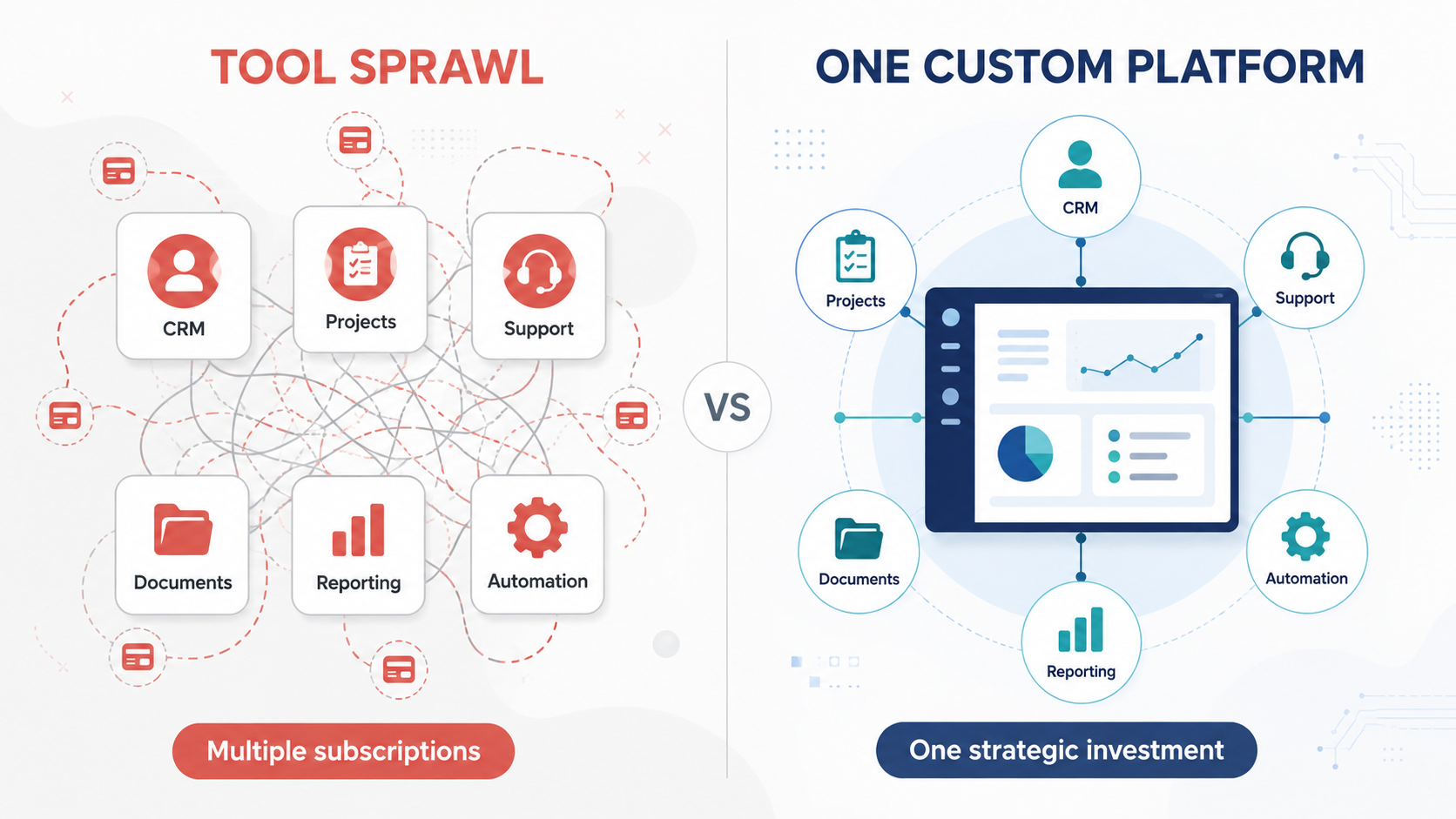
tool sprawl vs. one custom platform

Custom Software Development, Defined

Custom software development is the process of designing, building, and maintaining an application built specifically for one organization’s workflows, rather than licensing a one-size-fits-all product used by thousands of unrelated companies.

Off-the-shelf software is built for the average user. Custom software is built for you — your exact processes, your edge cases, your customers, your growth plan. It’s the difference between buying a suit off the rack and having one tailored to your measurements.

At Babysoft, we build everything from internal operations tools to customer-facing platforms, and the common thread is always the same: the software adapts to the business, not the other way around.

Why SMBs and Startups Actually Need This (Sooner Than You Think)

There’s a myth that custom software is only for enterprises with seven-figure IT budgets. In our experience, it’s often small and growing companies that benefit the most — because they’re the ones losing the most time to workarounds.

1. Your workflow is your competitive advantage. If your process is genuinely different from your competitors’, forcing it into generic software flattens that advantage. Custom development lets your operational edge become part of the product, not something you fight against.

2. Off-the-shelf tools multiply, and so do their costs. Most SMBs we work with are paying for 8–15 SaaS tools, each solving a slice of the problem. A custom system consolidates that sprawl into one platform built around how your team actually works — often reducing total software spend within the first year.

3. Scaling breaks generic tools first. Spreadsheets and no-code tools are great at 10 employees and start to crack at 50. Custom software is built to scale with your data volume, your team size, and your integrations from day one.

4. You own it. With licensed software, you’re renting. Pricing changes, features get deprecated, and companies get acquired or shut down. Custom software is an asset on your balance sheet — one that compounds in value as your business grows.

What the Babysoft Approach Looks Like

We’ve found that most “custom software” horror stories — blown budgets, six-month delays, a product nobody uses — come from treating development as a one-time build instead of a partnership. Our process is built to avoid that:

  • Discovery first. We map your actual workflows before writing a line of code, so we’re solving the real problem, not the one you think you have.
  • Modular builds. We ship in increments you can use and give feedback on, instead of disappearing for six months and hoping we got it right.
  • Built to integrate. Your custom system talks to your existing tools — payment processors, CRMs, accounting software — instead of becoming another island.
  • Designed for the business you’re becoming. We architect for your 3-year plan, not just your current headcount.

Is Custom Software Development Right for You?

A quick gut check we walk founders through:

  • Are you paying for multiple tools to do one job badly?
  • Does your team have manual “glue work” moving data between systems?
  • Is your process a genuine differentiator that generic software can’t capture?
  • Are you scaling fast enough that today’s tools won’t survive next year?

If you answered yes to two or more, it’s worth a conversation.

The Bottom Line

Custom software development isn’t about building something flashy — it’s about building something that fits. For SMB and startup founders, the right custom system doesn’t just save time; it removes the ceiling that generic tools quietly put on your growth.

That’s the perspective we bring to every engagement at Babysoft Software: your business isn’t generic, so your software shouldn’t be either.

Ready to see what a system built around your actual workflow could look like?

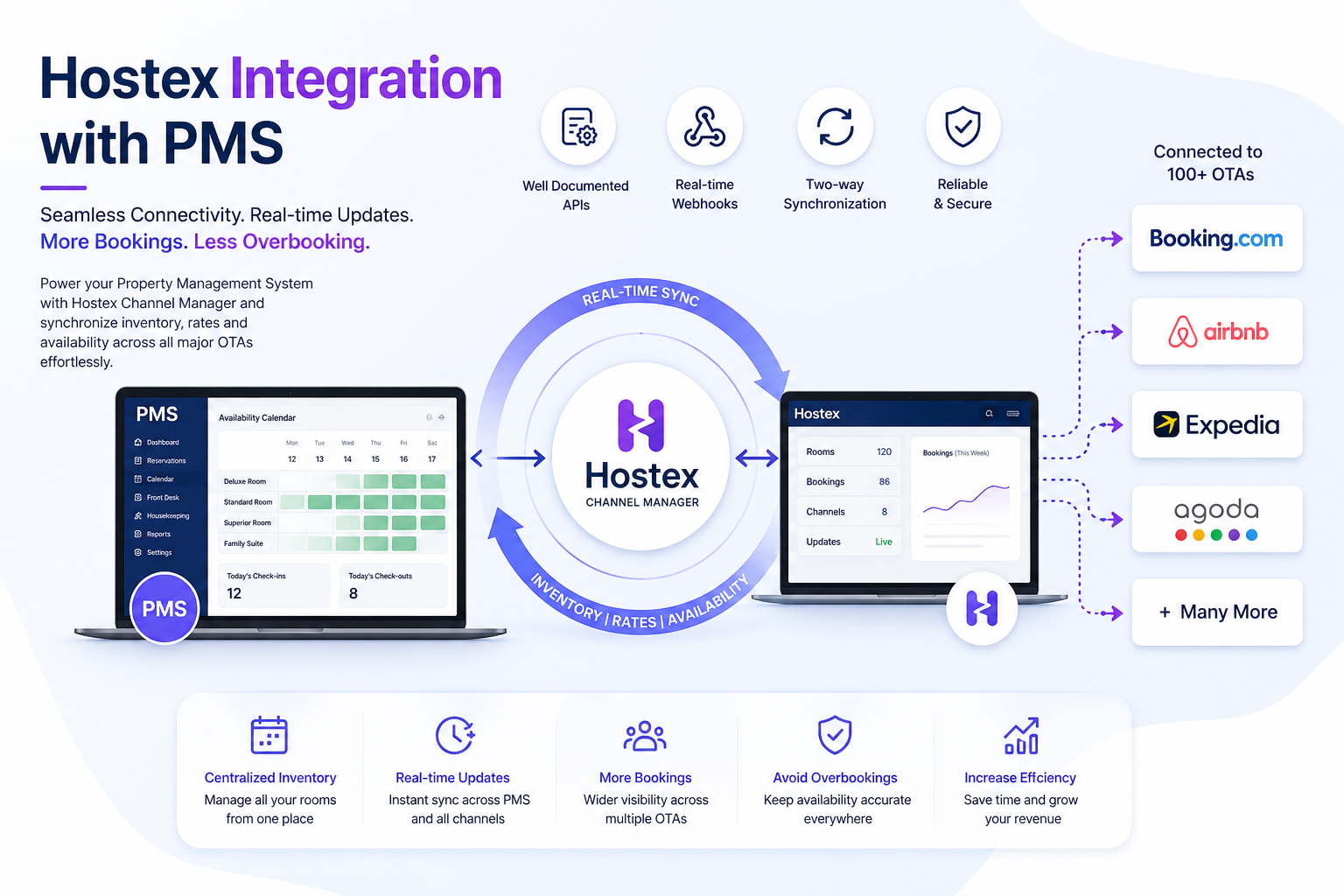
Hostex integration with PMS.

Power Your PMS with Seamless Channel Manager Integration

Looking to streamline your property management system and eliminate booking inefficiencies?

At Babysoft Software, we specialize in integrating powerful channel managers into PMS platforms—helping you manage inventory, availability, and bookings across multiple OTAs with ease.

We’ve successfully integrated leading platforms like Beds24, SiteMinder, and STAAH—and recently delivered a highly efficient integration with Hostex Channel Manager.

Why This Matters for Your Business

Channel managers are the backbone of modern hospitality operations. They ensure:

  • Real-time inventory and availability updates across all OTAs
  • Zero overbooking through instant synchronization
  • Centralized control of your property listings
  • Reduced manual effort and operational errors

Why Choose Our Integration Expertise

✔ Proven experience with multiple channel managers
✔ Fast and smooth API-based integration
✔ Real-time updates using robust webhook systems
✔ Scalable architecture for multi-property management
✔ Reduced development time with optimized implementation

Our Experience with Hostex

Our recent integration with Hostex stood out for its:

  • Clean and well-documented APIs
  • Seamless webhook functionality
  • Faster implementation compared to other platforms

This translates directly into lower costs, quicker deployment, and better performance for your business.

Let’s Build Your Next-Gen PMS

Whether you’re launching a new PMS or upgrading an existing one, we can help you integrate the right channel manager to maximize efficiency and revenue.

📩 Get in touch to discuss your project.


user centric

Web Design Services in Winnipeg: Build a Website That Works for Your Business

In today’s digital-first world, your website is often the first impression customers have of your business. Whether you run a local shop in The Forks or a service company in downtown Winnipeg, an attractive and functional website can make all the difference.

Why You Need Professional Web Design in Winnipeg

Winnipeg’s small business ecosystem is growing rapidly. But with growth comes competition — and a good website helps you:

  • 🌐 Stand out locally and online
  • 📲 Reach mobile users effectively
  • 🚀 Convert more visitors into customers
  • 🔐 Ensure your site is secure and fast

💡 What Makes a Great Website?

A great website is more than just good looks. Our web design services focus on:

1. Custom Design Tailored to Your Brand

We don’t use cookie-cutter templates. Your business is unique — your website should be too. Whether you’re an artist, mechanic, dentist, or retailer in Winnipeg, we design with your audience in mind.

2. Mobile-Responsive Layout

Over 60% of your traffic is likely from smartphones. We ensure your site looks and works perfectly on all screen sizes — phones, tablets, and desktops.

3. Search Engine Optimization (SEO)

A stunning website is useless if no one can find it. Our web design is backed by local SEO best practices, helping you rank on Google for terms like:

  • “Winnipeg plumber”
  • “Best bakery in Winnipeg”
  • “Web design services Winnipeg” 😉

4. Fast Loading Speed

Speed = better UX + higher rankings. We optimize all assets and code to give your site that extra boost in performance.

5. Easy to Manage

We build on platforms like WordPress, Webflow, or Shopify — giving you full control. Want to edit text or update images? No problem.


🛠️ Web Design Services We Offer in Winnipeg

✅ Business Website Design
✅ E-commerce Website Development
✅ Website Redesign & Optimization
✅ WordPress & CMS Integration
✅ Custom Landing Pages
✅ Website Maintenance & Support


👷 Who We Work With

We serve a wide range of local businesses in Winnipeg, including:

  • Restaurants & Cafes
  • Real Estate Agencies
  • Medical Clinics & Dentists
  • Service Providers (Plumbing, Cleaning, HVAC)
  • Nonprofits & Local Artists

💬 Why Choose Us?

As a Winnipeg-focused design team, we understand local business needs, culture, and customer behavior. We combine creativity with strategy to help you get real results — leads, bookings, and sales.

⭐ “The team delivered exactly what we wanted. Professional, fast, and easy to work with!” – Local Business Owner, Winnipeg


📞 Ready to Transform Your Online Presence?

Let’s build a website that not only looks great — but also works hard for your business.
👉 Contact us for a free consultation on web design services in Winnipeg!